Browser wallet
The site does not auto-connect your wallet. Loading NFTs and analyzing CIDs work without a wallet; connect only when you want to send a transaction, such as unlisting on Foundation.
Your API keys (optional)
Keys you save here stay in this browser (localStorage). They are sent over HTTPS to this site's API routes when you load NFTs, export a ZIP, or pin CIDs. They are not stored in a CIDKeeper database. The hosted app relies on small free-tier quotas when you skip your own Alchemy key. Anyone who can observe or modify this deployment could intercept keys, so use credentials you can rotate. Your 4EVERLAND pin access token is sent only for pin requests so the server can call 4EVERLAND on your behalf (same CID; no re-upload). Self-hosted deployments may optionally set FOUR_EVERLAND_TOKEN in the server environment instead of using the field below.
How to get your Alchemy API key
CIDKeeper needs an Alchemy key to list NFTs and build ZIP exports. Create a dedicated app in your Alchemy account so you can rotate or cap usage independently. Steps below follow the dashboard in order.
Open Alchemy, go to My Apps, and click Create new app.
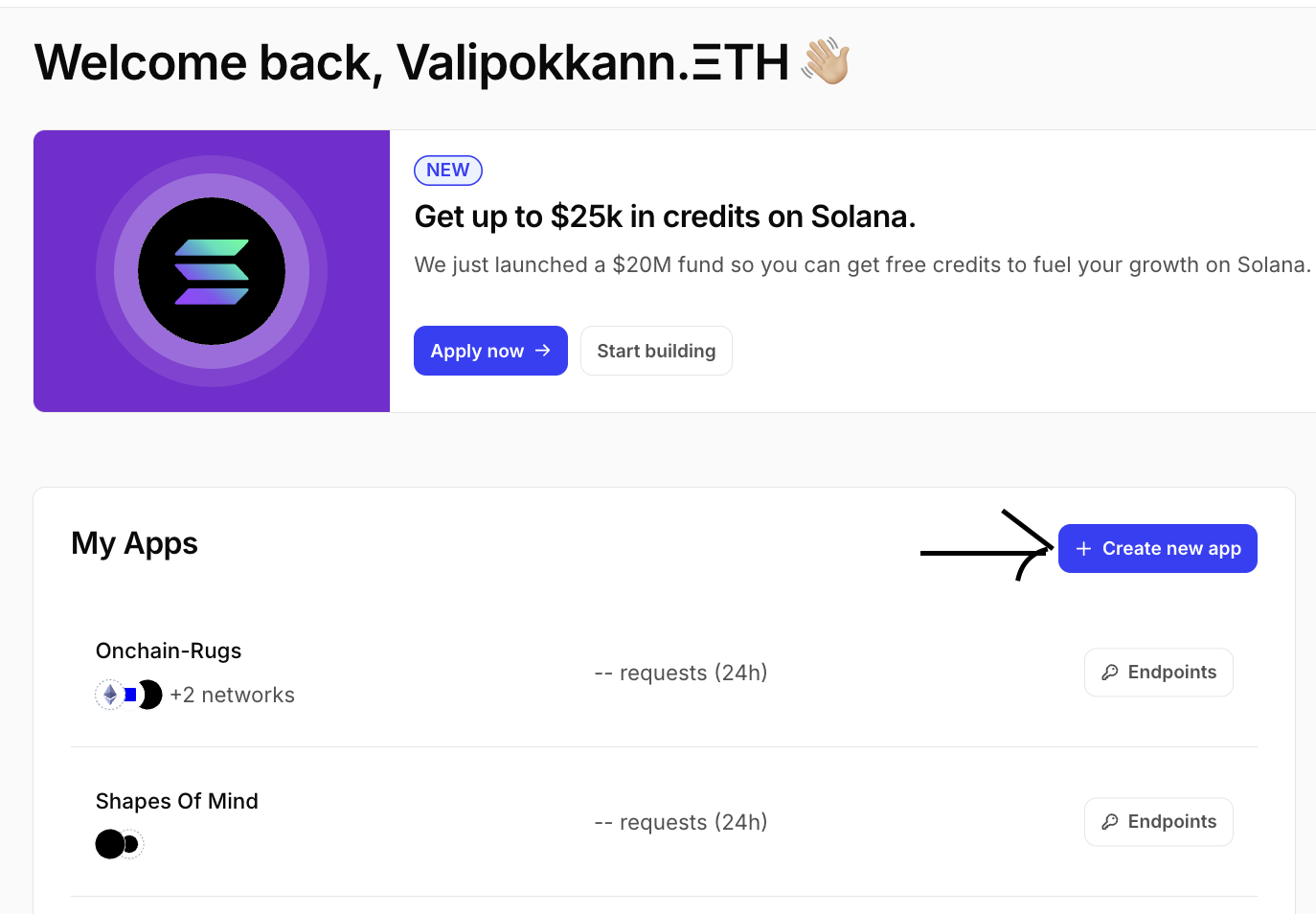
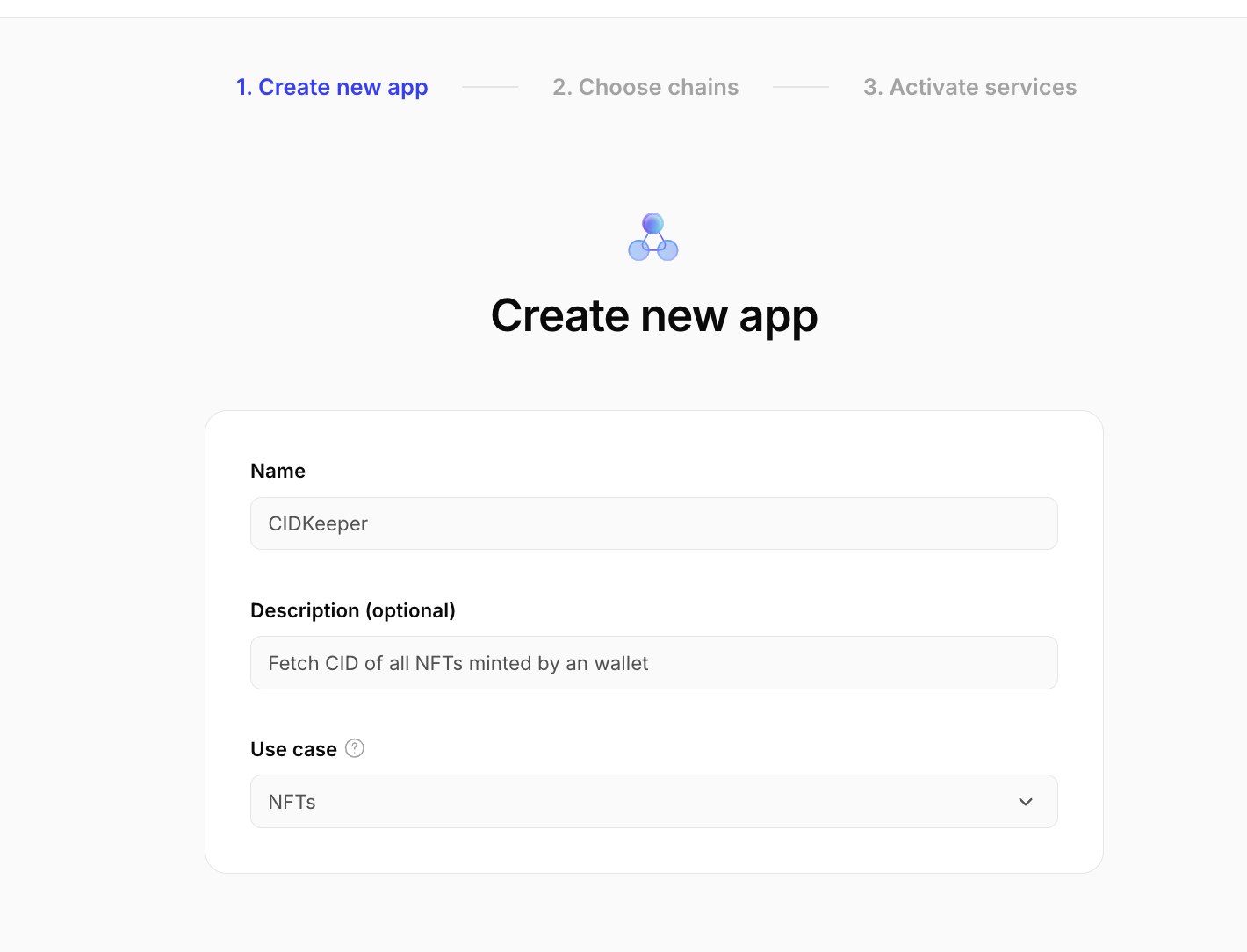
Name your app (for example CIDKeeper), add a short description, set the use case to NFTs, then continue.
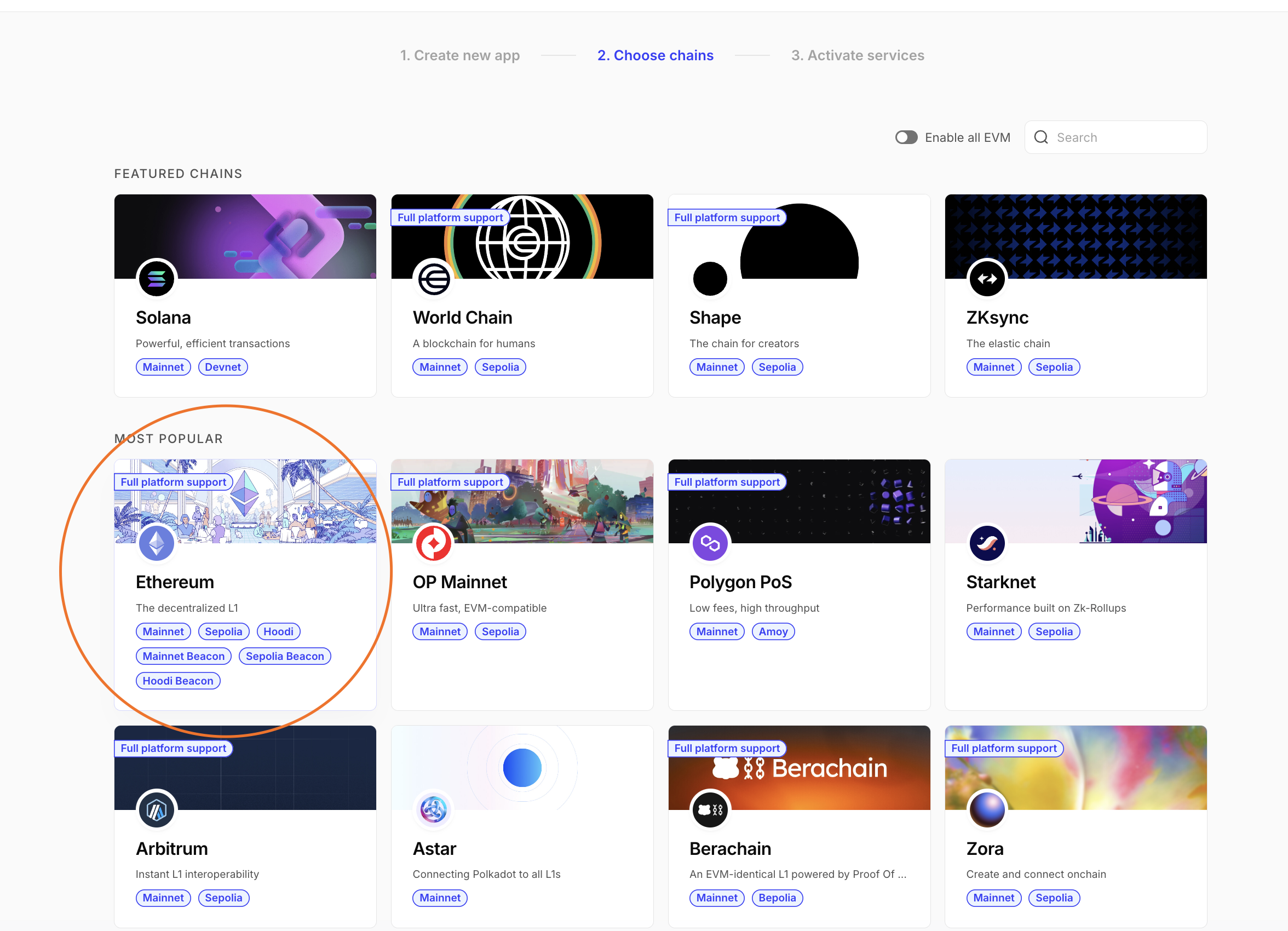
Choose chains: select Ethereum and the networks you need (for example Ethereum Mainnet).
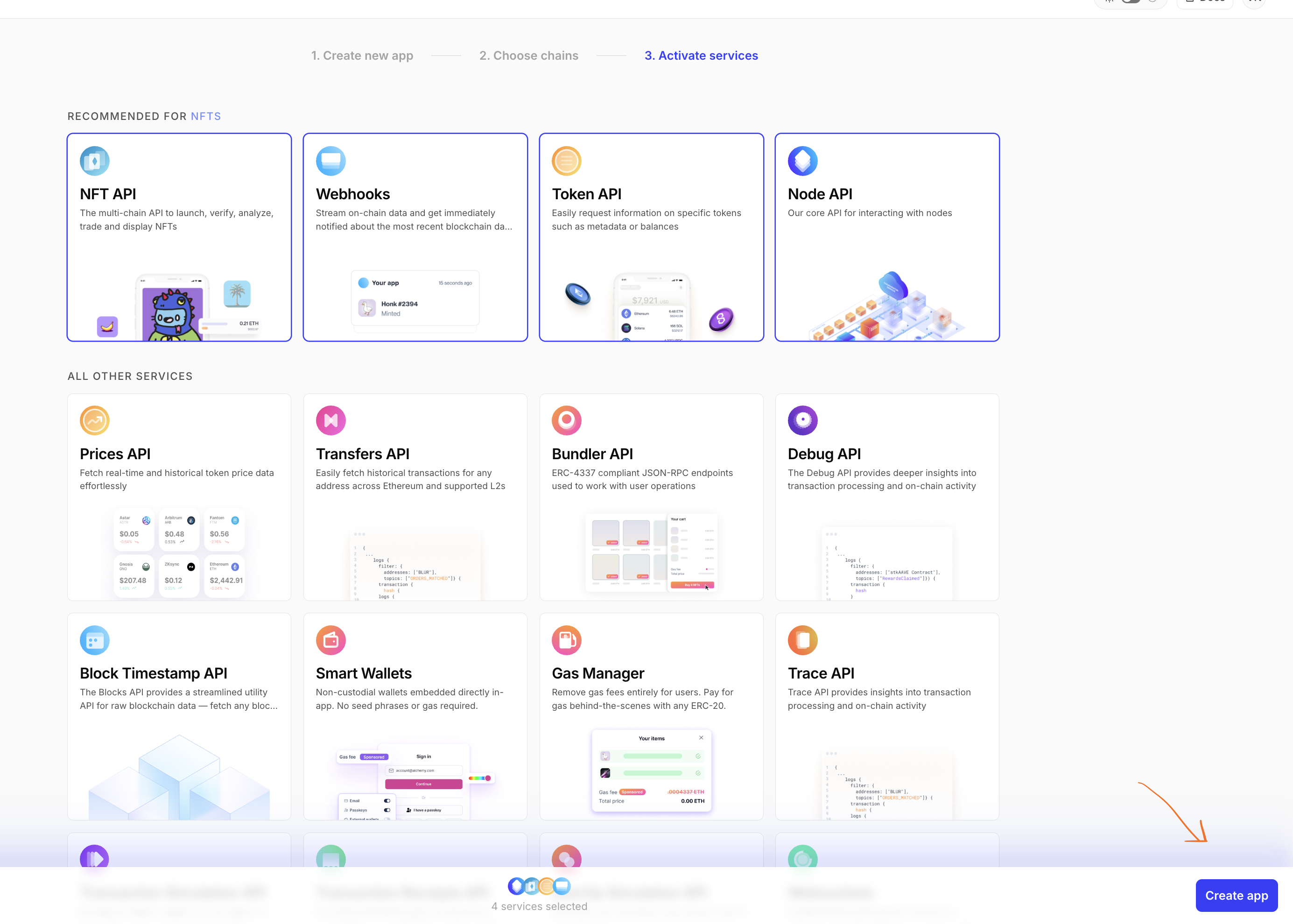
Activate services: keep the recommended NFT-related APIs selected, then click Create app.
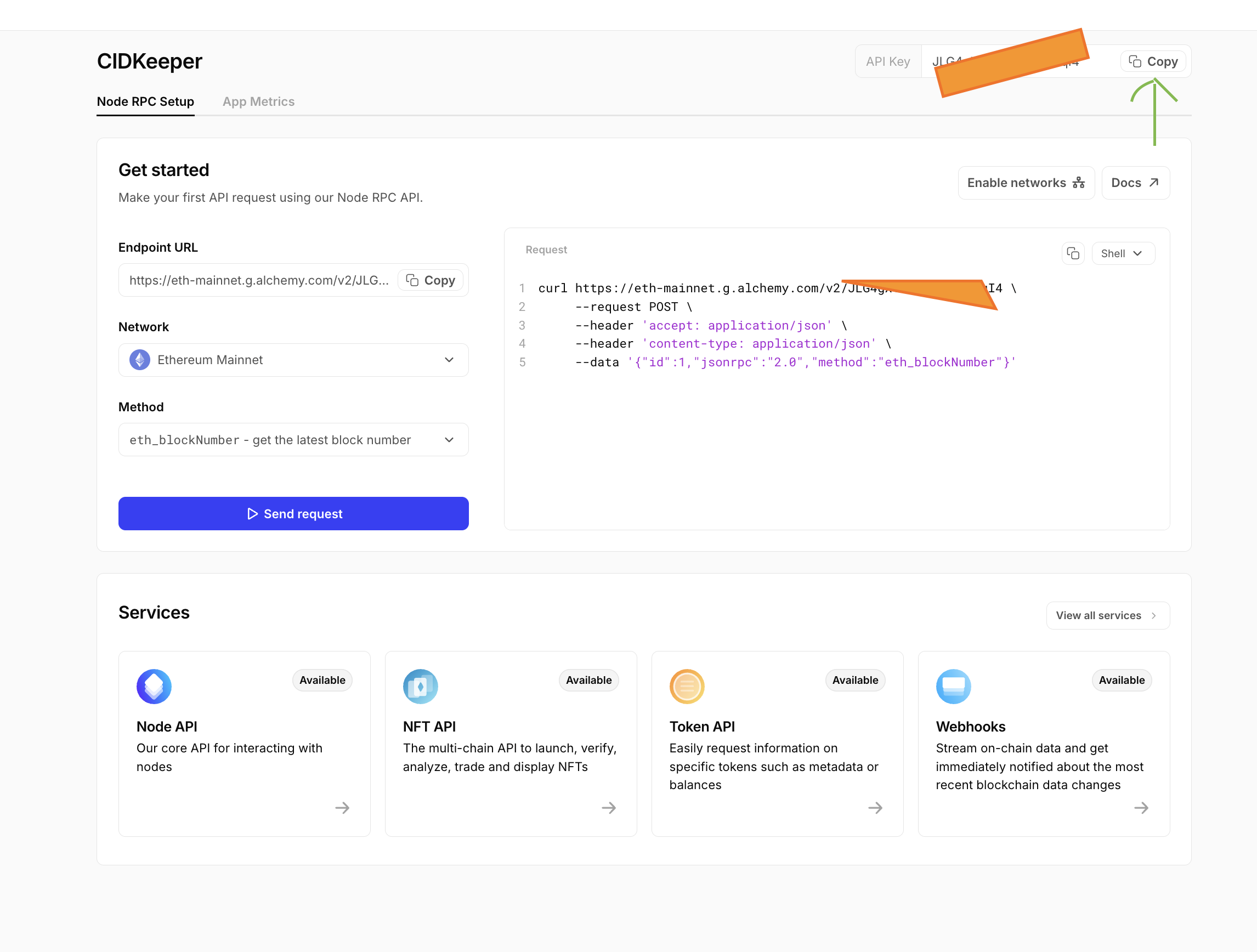
On your app’s setup page, copy the API key and paste it into Alchemy API key above, then save to this browser.
Foundation factory contracts (built-in list and extra addresses)
CIDKeeper already includes the main Foundation factory contracts and indexed events, which cover almost all typical mint paths. The extra address list is entirely optional—use it only if you hit a rare factory or event variant that is not represented here, for example when some of your minted Foundation works are missing from the Created inventory. In that case, contact Valipokkann on X (Twitter) with the collection contract and what you expected to see.
Built-in Foundation factory contracts
- 0x3B612a5B49e025a6e4bA4eE4FB1EF46D13588059
- 0x612E2DadDc89d91409e40f946f9f7CfE422e777E
Additional factory addresses
Add other collection-factory contracts that emit the same indexed event layout only when you need a missing factory (see note above). Stored only in this browser (localStorage), up to 24 addresses. Used when Include factory-created collections is enabled.
No extra factories saved yet.
How-to video
Walkthrough of using CIDKeeper on YouTube (wallet scan, CID checks, export, and pinning).
IPFS and NFT backup FAQ
This page is focused on NFT backup, IPFS pinning, Foundation listing checks, and long-term marketplace asset recovery. If you are indexing large collections, start with wallet scan, then filter by storage, health, listing, and pin status.
What are CIDs?
A content identifier (CID) is how IPFS names content-addressed data. It is built from cryptographic hashes and metadata about how to interpret the data (via multiformats such as multihash, multicodec, and multibase), not from a server hostname. The same file imported with the same settings should yield the same CID, which is why tools can fetch or pin by CID without trusting a single host.
For a deeper technical walkthrough, read Content identifiers (CIDs) and content addressing in the official IPFS documentation.
You can also preserve NFT assets yourself by running an IPFS node and pinning the same CIDs CIDKeeper shows. Install a full node (for example Kubo, the reference implementation behind the ipfs CLI, or IPFS Desktop which bundles it), run ipfs init once, then start the daemon with ipfs daemon (or launch Desktop). To keep an existing DAG reachable from your disk, use ipfs pin add /ipfs/<your-cid> (often with a recursive pin for large trees). Your node then stores the blocks locally and can serve them to peers on the network. Follow the IPFS command-line install guide and the docs on pinning and gateways for production hardening.
How does CIDKeeper back up NFTs from IPFS?
CIDKeeper loads wallet NFTs, extracts metadata and asset CIDs, checks gateway health, then exports exact bytes into a ZIP manifest so you keep an offline backup.
Can I pin NFT CIDs without re-uploading files?
Yes. Pin selected submits existing IPFS CIDs to 4EVERLAND pinning service. CIDKeeper checks current pin status first and skips CIDs already queued, pinning, or pinned.
Can I check Foundation marketplace listing status?
Yes. CIDKeeper can resolve whether NFTs are currently listed on Foundation and lets you filter listed or unlisted items in larger collections.
Does CIDKeeper work for Arweave NFTs too?
CIDKeeper detects Arweave primaries and labels them clearly. IPFS gateway health and pinning apply to IPFS CIDs, while Arweave items can still be inspected in the same collection view.
Why do I need an Alchemy API key?
You do not strictly need one. The hosted deployment can fall back on a shared key so you can try the app right away, but shared keys sit on small free-tier quotas, so you may hit rate limits or slower responses when traffic is high. Adding your own Alchemy key under Your API keys gives you your own quota and a steadier experience. You can rotate the key whenever you like.
Why do I need a 4EVERLAND pin access token?
Only if you want to pin existing IPFS CIDs through 4EVERLAND from CIDKeeper. Listing NFTs, analyzing CIDs, and ZIP export do not require it. 4EVERLAND offers a generous free tier for pinning (including multiple gigabytes on typical plans; check their dashboard for current limits). Account creation may ask for a one-time on-chain verification step, often paid in a small amount of native token on a supported chain such as Polygon or BNB Smart Chain, depending on their flow and network fees. After that, pinning within your tier can remain free. Always confirm the latest requirements and pricing on 4EVERLAND.
Do I need API keys to unlist on Foundation?
No. The Foundation unlist shortcut uses public Ethereum mainnet data plus a normal wallet transaction to clear a listing. It does not depend on Alchemy or 4EVERLAND. The smart contracts remain on-chain even if this site goes offline: in principle you could call the right function yourself through Etherscan or another block explorer, but finding the correct contract, selector, and calldata is slow and error-prone even for experienced users. CIDKeeper is there so you can unlist in a guided way with one clear flow after your wallet confirms the transaction.
Can I bulk unlist?
Not in this app. Foundation listings commonly use an escrow-style model: while listed, the token may sit in a Foundation-controlled contract rather than only relying on approvals you can revoke in bulk. A script could send many unlist transactions back to back, but that brings real operational risk: if one transaction hangs, later ones can pile up behind nonce ordering until you replace or cancel transactions manually, which means tuning gas, timing, and sometimes explorer-level intervention. CIDKeeper stays deliberately simple so artists can see how a single unlist works without juggling batch sends and nonce recovery. For several listings, unlist them one at a time here.
Do I need to connect my wallet?
No. Connecting a wallet is optional and does not change listing, analysis, export, or pinning. You only need a wallet connection when you want to unlist Foundation works, because that flow must send an on-chain transaction from your account.
Open source on GitHub
The public deployment uses shared provider quotas on free tiers. Please add your own Alchemy API key (and a 4EVERLAND pin token if you use pinning) under Your API keys so everyone gets a reliable experience. Prefer even more control? Clone the repo and run it locally with your keys in .env, or open issues and pull requests to improve CIDKeeper.
innovinitylabs / CIDKeeper on GitHub